


Do you need a basic resume? Get a head start with a professionally designed basic resume template download.


The design of your resume plays an important role. When done right, it can help you get hired, but if you miss the mark and get your resume design wrong, it can land your resume in the trash pile instead.
Starting with a simple basic resume template is a great way to ensure your resume is structured the right way. With templates, you can create a resume that looks modern and attractive enough to get noticed.
15 Basic Resume Template Examples From Envato Elements (With Great Designs)
Take a look at some of the amazing, basic CV template designs that Envato Elements has to offer for you to use in 2024. A professional, modern template will help you make a great resume fast.
1. Resume Anna - Basic Resume Template Download
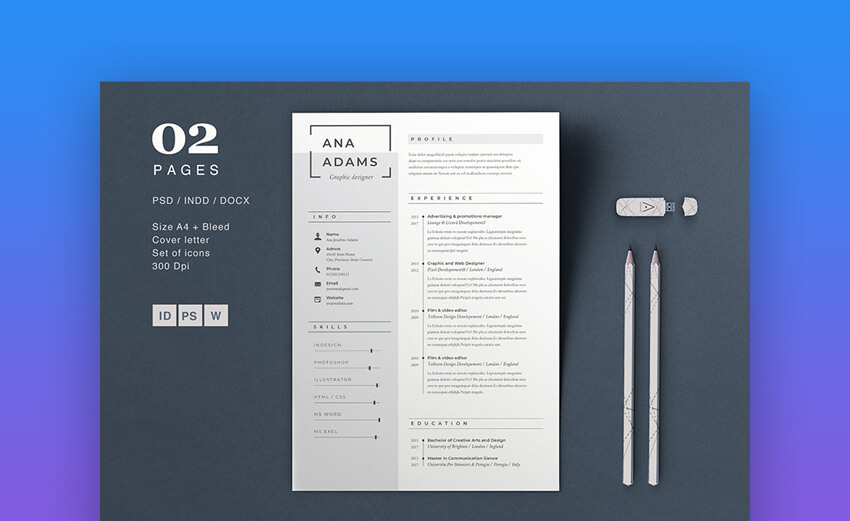
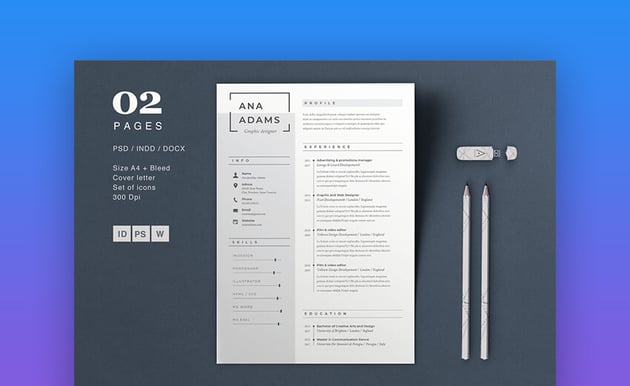


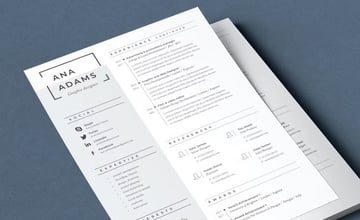


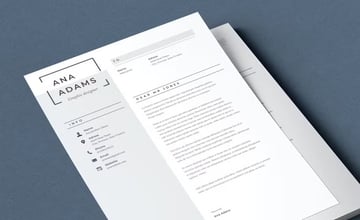
Anna is an elegant resume template with a basic design. Featuring a two-column design, the layout makes it easy to focus on relevant information.
Edit this sample basic resume template download in Photoshop, as well as Word and InDesign. You’ll have no problems customizing the design with your choice of fonts and colors.
2. Appeal CV Resume Designer - Simple and Clean Resume Template


The Appeal CV Resume Design has a clean layout with your contact information prominently displayed at the top. Along with your contact information is a profile photo.
The rest of the template follows a two-column layout. This layout has clearly marked sections for education, experience, skills, and more. You can edit this template with Adobe InDesign.
3. Jack Business - Clean Resume Template


The Jack Business Clean Resume is perfect if you’re looking for a minimal design. The template is easy to use and customize with InDesign. The template has plenty of space to add all the important information and features an impactful photo at the top.
4. CV Resume - Basic Resume Template Download


The CV Resume is a basic template as it can be, featuring subtle blue accent lines and icons. The template is modern and can be easily customized using Photoshop and Illustrator. It includes well-organized layers as well as help file with a list of fonts used in the template.
5. Clean Resume CV Vol. 41 - Basic Resume Template Download


This is one of the classiest basic resume templates out there! It has a classic appeal and a basic design that gives it a unique look. You can tweak it with Photoshop.
The basic resume template download uses smart objects so you can easily replace photos with your own.
6. Basic Curriculum Vitae Template


This may be a basic resume template download, but is really eye-catching. It features a near design with dots of color to highlight the key points. You'll get:
- an easy to edit basic resume format template
- cover letter and basic CV template
- well-organized layers
- file with free fonts
7. Word Sample Basic Resume Template Download


If you're looking for a basic curriculum vitae template, take a look at this. It features bleed and a smart object layer, so it's all set for you to customize.
You can edit this basic resume template download in Photoshop and Illustrator. It comes in A4 & US Letter sizes. It uses free fonts and fully print ready!
8. Clean Basic Resume Format Template


Here's a basic resume template download with a ton of feature's that you'll love. It has a beautiful, aesthetic design. The features include:
- two pages
- cover letter template
- drag-and-drop image placeholders
- InDesign, Word, Photoshop, and Illustrator files
9. Basic Resume Template Download


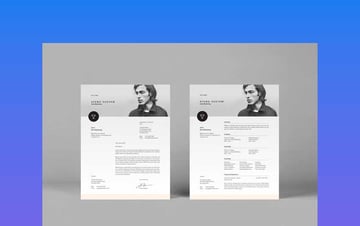
There's lots of room for visual appeal in this basic resume format template. There's a top header where you can add an image to introduce yourself. It's very easy to customize in InDesign.
Also, you can edit everything so it fits your needs. It's one of the best resume templates with a basic design.
10. Cool Basic CV Template


With an asymmetrical design, this basic resume template download has a fun approach. There's room to list your experience, education, and skills. Moreover, you'll get:
- print-ready resume templates with basic layouts
- fully organized and labeled layers
- Adobe Illustrator files
- used Google Fonts
11. Minimalist Basic Resume Templates


Ideal for creatives, this basic resume template download is minimalistic. You can edit this file in Adobe Illustrator and Photoshop. With two A4-size pages, you can also write a cover letter to introduce yourself.
It's a great sample basic resume template. You can change the colors and use the free fonts to add your own touch!
12. Minimalist Basic Curriculum Vitae Template


It only takes a few hints of color to make this basic resume template download an outstanding choice. The text blocks are well distributed, so it's easy and enjoyable to read. It features:
- well-organized layers
- Illustrator and Photoshop files
- 2 pages for resume and cover letter
- easily editable basic resume format template
13. Simple Basic Resume Template


This may be the simplest yet most modern layout. It's one of the basic resume templates that you can use again and again. The geometrical design will catch anyone's attention.
Moreover, this basic resume template download comes in five different color variations. And it's easy and quick to edit thanks to the well organized layers. There are 5 Illustrator and 10 Photoshop files included.
14. Fun Resume Template With Basic Layout


Who said that a resume template with a basic design can't be creative? This basic curriculum vitae template is the proof that it's, in fact, possible. There are great features included, such as:
- free fonts used
- Illustrator and Photoshop files
- a very visually appealing layout
- resume and cover letter templates
15. Colorful Basic Resume Templates


Here's a set of colorful and vibrant basic resume templates. They're both simple and professional, and can work perfectly for any kind of job application.
There are files you can edit in Photoshop, InDesign, and Illustrator. Everything is setup in CMYK color format.
How to Customize Your Resume
When you get a basic resume template download, you'll want to customize it. I'll be using this Fashion Designer Resume Template. Here's the resume template with basic design before any edits:


Here are some key tips on how to customize basic resume templates:
1. Change the Text Color
I'm going to change the color of the name from blue to orange. First, highlight the text. Next click on the arrow next to the Font Color button.


When you click on this arrow a color menu appears. Select the color that you want to change the text to. You've successfully changed the color of the text.
2. Delete an Object
Click on the object that you want to delete. You'll know that you selected the correct object when there are handles surrounding the object.


Once there are handles surrounding the object press the Delete button on your keyboard. This gets rid of the object you've selected.
3. Replace the Default Text
You can easily replace the text that comes with the template. Highlight the text that you don't want. You'll know that the text is highlighted when there's transparent blue over the text.


After you've highlighted the text press the Delete button on your keyboard.
Now you can add your own text to the basic resume template download. By doing so, you can make sure it suits the job that you're applying to.
5 Quick Tips to Make Basic Resume Templates Stand Out
Now you’ve seen basic resume templates. You know where to get them. Now, let’s look at some basic tips and tutorials that'll help you create a standout resume that'll get you hired.
1. Start by Outlining Your Resume
The first tip is to outline your resume. Doing so will allow you to determine which information should be included on your resume and how to structure it in a logical way.
Keep the basic resume sections in mind. Present them in a way that answers the question: “Which information is relevant to my potential employer?” This way, any recruiter can immediately tell if you’re the right candidate for the job.
Here's a great article if you'd like to get some help to outline your relevant accomplishments:


2. Learn How to Use a Word Resume Template to Create Your Resume
By now, you probably know how to use Word for the most basic tasks. But editing a resume template requires a few extra skills. A resume uses a slightly different structure than the standard documents.
Knowing how to edit and customize a Word resume template makes the whole resume creation process a lot easier, not to mention you'll be able to take your resume creation skills to the next level and create a truly standout resume.


3. Get Creative in 2024
Just because you’re using a basic resume template, that doesn’t mean you can’t get creative. Consider creating a resume website that accompanies your standard, printed resume.
The primary benefit of your own resume website is that you've got control over what the recruiters see when they google your name. A resume website will show up in search results for your name. So, you reduce the chances of recruiters stumbling onto a result where you don’t control the information.
Discover more creative resume tips:


4. Don’t Forget to Include Relevant Skills
Once you've got the outline and the basic resume format right, and you know how to design a functional resume, don’t forget to include any relevant skills that would help you land the job you’re applying for.
Listing your skills is another opportunity to include keywords on your resume. This makes it easier for recruiters to see what else you bring to the table.


5. Stand Out With a Personal Brand Statement
Lastly, consider including a personal brand statement on your resume. This summarizes why you’re the perfect choice for the job in question and the values you bring to the company.
When you take time to craft a memorable personal brand statement, you've got much better chances of standing out among hundreds, if not thousands, of other resumes. Your personal brand statement can be the tipping point in your favor that puts you on top and gets you called in for an interview.
Learn more in the article below:


5 Simple Design Trends for More Professional Resumes in 2024
You're already getting a head start on your resume with a basic resume template download. But to really impress the hiring manager, stay on top of the latest resume trends. Here are five resume trends to watch in 2024:
1. Social Media Section


In 2024 most resume templates have a social media section. Even basic resumes now have a social media section.
Having a social media section helps the hiring manager get to know you better. A social media section can also be a great place to link to your professional website.
2. Tech Skills Section
Having a tech skills section is a new trend that's on most basic resumes in 2024. This section shows your future employer that you've got the skills for the job. It can include basic skills in programs such as Microsoft Word, Adobe Illustrator or more technical skills.
Learn more about including skills on your resume in this article:


3. Simple Font


When looking for resume template you'll want one that's got a simple and easy to read font. If the hiring manager can't read your resume, they'll most likely throw it away. If you're unsure whether your resume's font is readable, pick another font or ask a friend to read your resume.
4. Single-Page Resume
Having a single-page resume allows the hiring manager to quickly skim through the resume. A single-page resume showcases your most recent experience. It's more convenient and memorable for the hiring manager reading it.
Here are some tips for creating a single-page resume:


5. Use Color Strategically


Use color to highlight important sections of your resume that you want to emphasize.
Discover More Simple Resumes With Pro Designs for 2024
Didn't find the ideal basic resume template download? Envato Elements has hundreds of them.
Here are some articles that feature templates:
 20 Best Software Engineer Resume Templates for 2024


 40+ Professional MS Word Resume Templates, Simple CV Design Formats 2024 (+ Video)


 30+ Simple Resume CV Templates (Easily Customizable & Editable for 2024)

.jpg)
.jpg) 24 Creative PowerPoint Resume Examples (Best CV PPT Templates 2024)
24 Creative PowerPoint Resume Examples (Best CV PPT Templates 2024)

Common Resume Questions Answered (FAQ)
Here are some common resume questions and answers:
1. How Do I Structure My Resume?
You need to have some must-haves on your resume such as:
- contact information
- job history
- and education
Many templates from Envato Elements are structured to help you include the needed information. Here's an article on how to structure your resume:


2. How Do I Create a Digital Resume?
There are many types of digital resumes. Here are two types:
- Video resume. This is a video presentation of your skills. If you decide to create a video resume, you need to practice giving concise and focused answers.
- PowerPoint resume. This option allows you to illustrate your resume by using images, graphics, and audio. When you're done, you can post it online.
3. What Length Should My Resume Be?
It’s recommended that most resumes are one page in length. But if you're in a technical field or a senior manager, it’s recommended that your resume be more than one page.
You can have a one-page resume by taking out the fluff. For example, use a timeline for job history to save space.


4. How Do I Make My Resume Stand Out?
There are many ways you can make your resume stand out. Here are two tips:
- Start with strong words. The first 20 words of your resume are critical.
- Add context to your job title. Instead of just including your job title, include what some of your duties are.
For more tips, read this article:


5. What Should I Do About a Reference Page?
It's best to keep your references to three. Most hiring managers won't call more than three people to check your experience.
Also, make sure that your references are people who can talk a lot about your skills. If your reference can’t do that, they could leave a bad impression on your hiring manager.
Here's more information about how to choose the right references:
.jpg)
.jpg)
Learn More About Making Great Resumes
The tips above are a great starting point to customize your basic resume template download. They'll help you make sure it matches your skills and the job you’re applying. But there's a lot more to learn when it comes to making a great resume.
Here are a few tutorials that'll help you get even more out of your resume.

 30+ Best Resume Tips: That Will Get You Noticed and Hired


 How to Use ChatGPT to Write a Resume (+Video)
.jpg)
.jpg)

 How to Make Your First Job Resume Stand Out
Find Basic Resume Templates on Envato Elements
A great place to find a simple basic resume template is Envato Elements. It's got thousands of basic resume templates that'll help you present your information in the best way.
You may be tempted to get a free basic resume template download from the internet. But don't be fooled! Those usually lack the features of even a professionally designed basic resume template.
There's another reason why you should check out Envato Elements. For a low monthly fee, you can download as many basic resume templates as you want. Also find other design assets such as photos, fonts, icons, and more.


Plus, now Envato Elements has introduced an AI-powered search feature! This new tool allows you to input a description of your project to effortlessly locate the finest human-crafted resources.


Start creating your next resume with an Envato Elements basic CV template!
Impress Employers With a Basic, Yet Modern Resume in 2024
When it comes to your resume, the saying “less is more” rings true. Given that recruiters only spend a few seconds on each resume, it’s important to keep your resume clean and clutter free. Yet you need to stress the important information that'll get you noticed and invited for an interview.
Don't fall into the trap of getting a basic resume template download for free. Free resume templates usually lack the finished look that'll help your resume stand out. Instead, opt for a professionally designed basic resume format template.
Find your perfect simple resume over on Envato Elements now!
Editorial Note: This post has been updated with contributions from Sarah Joy and Renata Martín Intriago. Sarah is a freelance instructor for Envato Tuts+. Renata is a Staff Writer with Envato Tuts+.
 By
By


