
 Lessons: 17Length: 39 minutes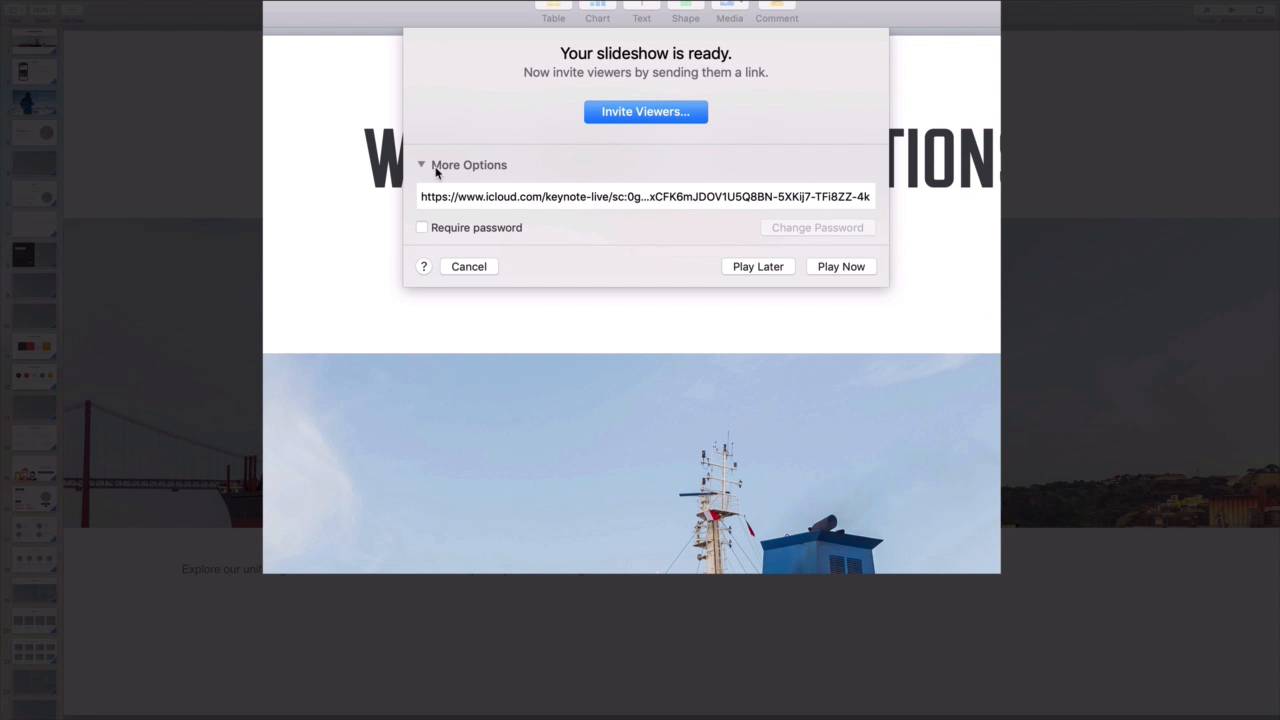
- Overview
- Transcript
5.2 How to Broadcast Your Presentation With Keynote Live
Need to share your presentation, but can't get everyone in the same room? Keynote Live might be the perfect solution for you. Use this feature to share your presentation online.
1.Introduction
1.1Introduction00:58
2.Working With Templates
2.1How to Choose a Keynote Template03:02
2.2How to Edit a Keynote Slide Layout02:54
2.3How to Edit Keynote Slide Masters02:37
3.Working With Multimedia and Animations
3.1How to Add Music to Apple Keynote02:53
3.2How to Add Images in Apple Keynote03:14
3.3How to Use Apple Keynote Magic Move01:41
3.4How to Make a Video With Apple Keynote01:58
3.5How to Add a Background Image in Apple Keynote03:18
3.6How to Use Keynote Animations02:26
4.Building Charts, Infographics, and Custom Visuals
4.1How to Edit a Keynote Chart02:23
4.2How to Edit Keynote Infographics01:55
4.3How to Create Device Mockups in Apple Keynote02:22
4.4How to Add and Use Custom Fonts in Apple Keynote02:38
5.Presenting With Confidence in Keynote
5.1How to Add and Use Presenter Notes in Apple Keynote02:14
5.2How to Broadcast Your Presentation With Keynote Live01:55
6.Conclusion
6.1Wrapping Up00:39
5.2 How to Broadcast Your Presentation With Keynote Live
Once you've built your Keynote presentation, it's time to share it with an audience. Of course, you might choose to do this in person, but that's not your only option. Thanks to keynote live, you can share your slides in real time with anyone. Keynote live, is essentially an easy way to broadcast your presentation over the internet. Let's look at how to use it. I've finished my presentation here, and I'm ready to share it. My audiences are scattered all over the globe, so getting everyone together just is impossible. Instead, I want to share it online. I'll come here on the Keynote Live option on the menu, and click on it. An option will appear, telling me that I need to move the presentation to iCloud. iCloud is Apple's online storage and sharing service, and it's needed for Keynote Live. I'll save it there and then click to continue. This next screen is a menu of options for sharing with Keynote Live. I can explore these to discover the sharing option that works best. Perhaps the simplest option is to just send viewers a URL. I can find this by clicking on More Options, and then copying and sharing the URL. I also have the option to add enhance security, by requiring a password here. I highly recommend this. No matter how complex a web link may seem, sharing any confidential slides with Keynote Live, will benefit from that extra security. I'll enter a quick password here. A final option is to invite viewers, where I have the ability to share the keynote slides with only a select few people. This avoids having to send out a link, and keeps your presentation contained to a smaller audience. Now, I'll go ahead and display a preview of what the audience will see as they watch my presentation on Keynote Live. As a presenter, I can see info such as the number of viewers here in the corner. It should be noted that Keynote Live does not support live audio. It will play presentation audio, so you might want to record a narration in advance, and overlay it with your slides. Or, if sharing in real time, you can arrange a call in number and navigate through. Keynote Live is a unique feature that makes sharing truly effortless. Use it next time you're presenting to an audience but can't find a room to share. Thanks for watching.


